Space Ball Jump
An Unreal Engine 4.22 C++ Android game with object-pooled, randomly generated platforms, tap-to-jump controls, materials, lighting, emitters, and planet-inspired objectives.
 C++ / BlueprintsAndroidObject poolingRandom level generation
Taking a mobile game from idea to playable beta
Space Ball Jump is my independent Android game, combining simple tap controls with planet-inspired environments. I worked across gameplay, presentation, and the constraints of mobile hardware.
What I worked on
I built randomly generated platforms backed by an object pool, jump and double-jump mechanics, objectives, and interface elements. Lighting, materials, effects, and playtest feedback shaped the Mercury level and the beta released on Google Play.
Skills demonstrated
C++, Blueprints, Unreal Engine, random level generation, object pooling, mobile optimization, UI/UX, and technical art.



Space Ball Jump combines fast-paced platforming with planet-inspired environments. The documented Android beta features Mercury, with additional planets explored during design.
Planet Mercury
Challenging levels
Features
- Tap-to-jump controls and a double jump for demanding landings.
- Randomly generated platforms make each playthrough different.
- Optional objectives unlock space collectibles.
- Gems support progression and unlockable ball skins.
The design and development notes below follow the project from sketches and mobile prototypes to pooled platforms and collision handling.
Making a small screen feel like a journey through space
I built Space Ball Jump around two goals: fast-paced, tap-driven play and curiosity about the solar system. Mercury became the first playable level. The wider set of planets was a design direction, rather than a claim that every level shipped.
From paper patterns to playable decisions
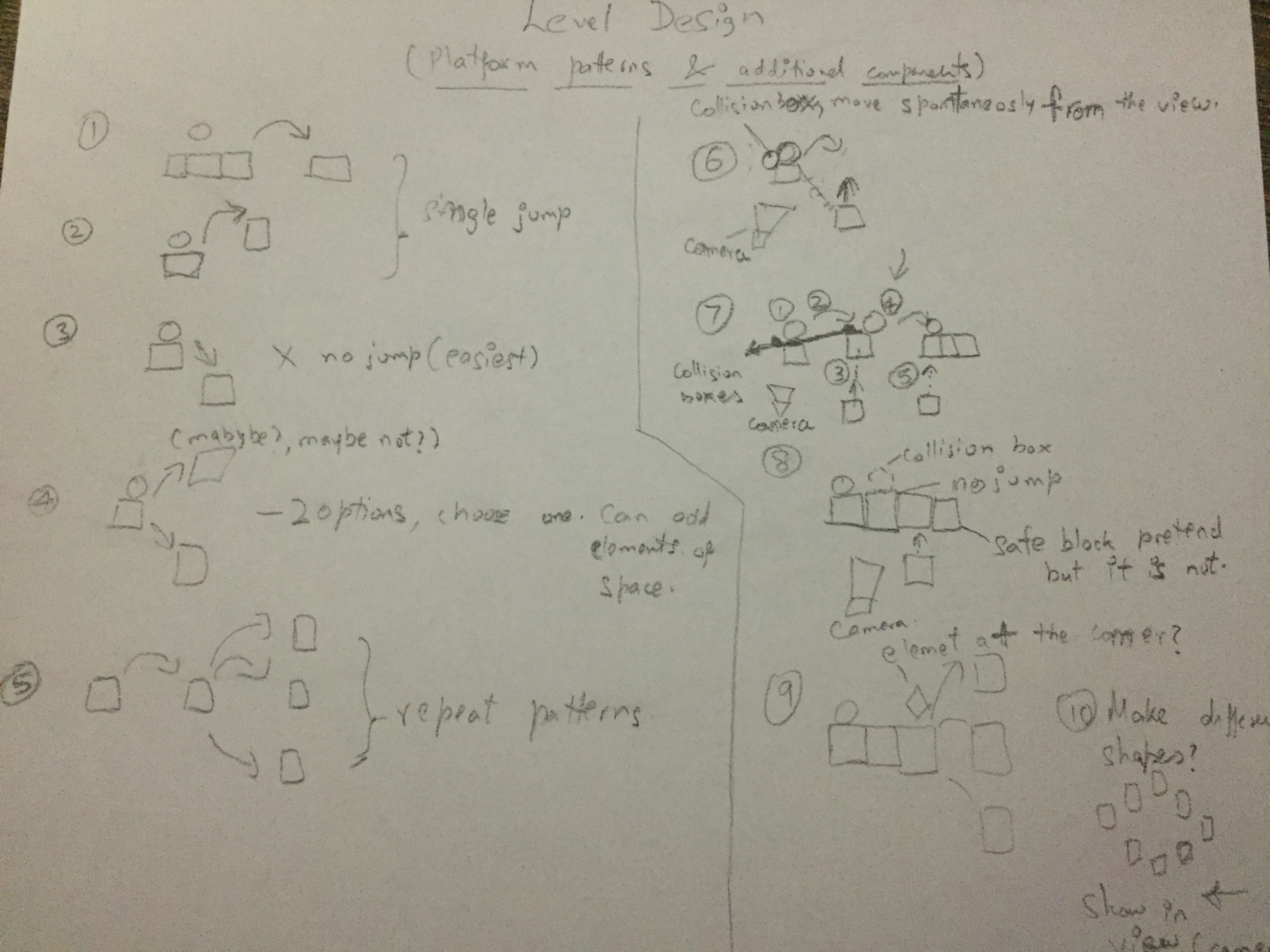
I used sketches, discussions, prototypes and playtests to work through the timing of each jump. Platforms needed to offer readable choices within a short window: jump once, double jump, or let the ball fall to a lower surface. Early experiments tested harder combinations before I simplified the opening level.
The ten platform patterns I explored
- A single jump between neighboring platforms.
- A higher platform requiring a double jump or a carefully timed jump.
- A lower platform that rewards the player for not jumping.
- A choice between higher and lower landing paths.
- Closely spaced decisions combining successive jumps.
- A platform revealed only as the player approaches.
- Repeated jumps with platforms revealed in sequence.
- Contiguous platforms where staying grounded is the right choice.
- Planet-themed objects layered into the platform patterns.
- Branching shapes that return to a shared path.
These were design experiments, not ten separately released game modes.
Camera, scale and the Mercury objective

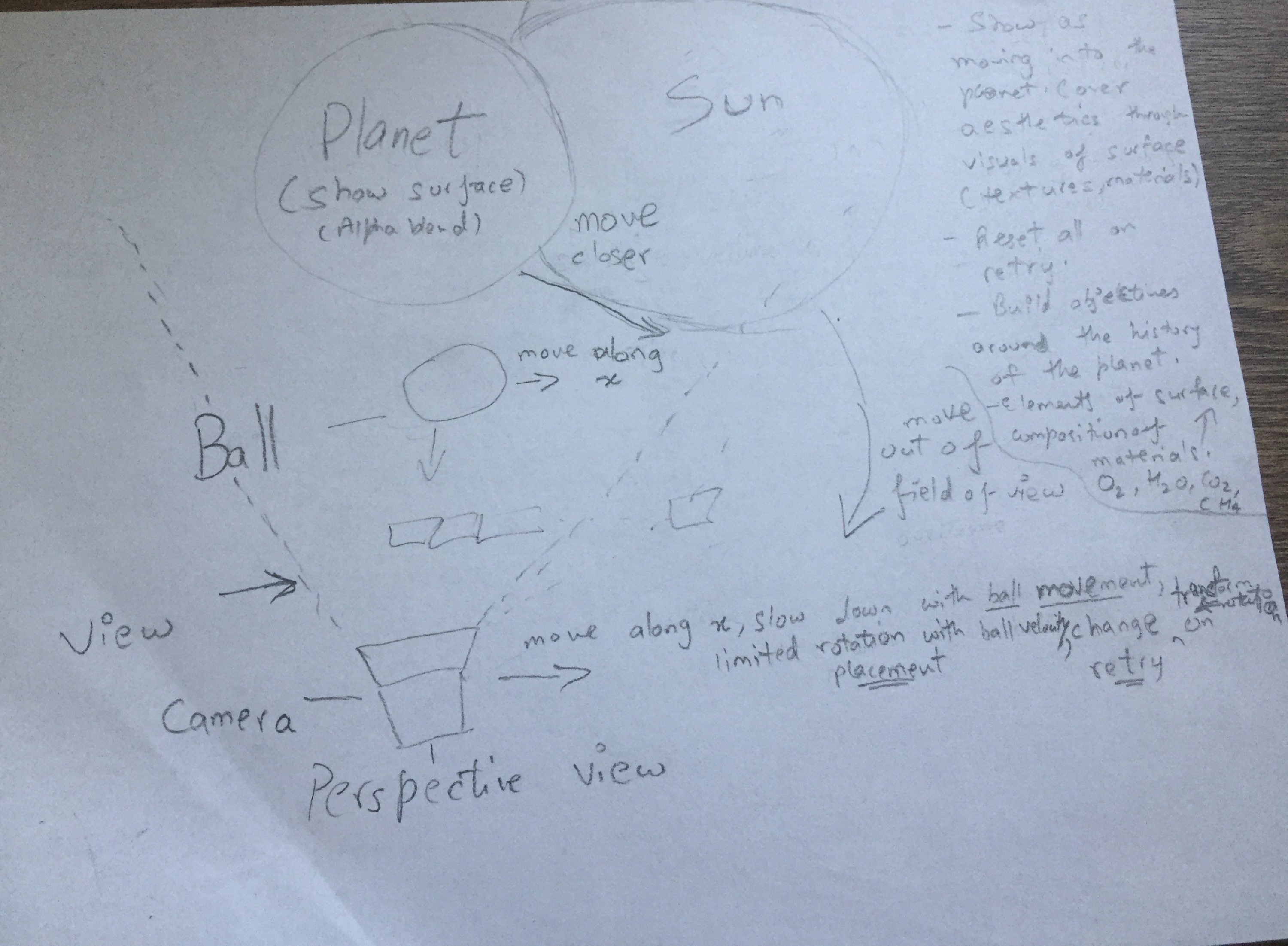
A perspective camera and changing actor transforms created the impression of traveling around the planet. The visible scene had to communicate scale without spending resources on an entire traversable world. Mercury’s craters inspired an optional objective: destroy three meteors to unlock a space collectible.
Playtesting led me to add a double jump as a second chance to reach a safe landing. It also became part of the meteor interaction. An emitter attached to the character supplied a burst of visual feedback when the jump fired.
A tutorial that stays inside the game
I explored a brief slow-motion tutorial and safe opening platforms so players could learn the tap timing while collecting gems. The character moves in one direction; the player concentrates on jump timing rather than steering. Harder patterns were useful prototypes, but the first level needed more breathing room.
Materials and lighting within mobile limits
I used Maya for models, Substance Designer and Painter for materials, and Photoshop for texture work, alpha masks and sprite effects. Public NASA material helped inform the planetary surfaces. Two collaborators contributed platform models and materials for the Mercury and Venus concepts; some supporting assets came from Epic Marketplace.

The interface used planets rendered in 3D, camera moves and a directional light to convey the Sun’s position. Texture blending helped describe surfaces and atmospheres, with the journal targeting small textures, around 512 × 512 pixels for these elements. During gameplay, lighting had to keep platforms readable as the apparent day/night angle changed.
Connecting the menu to the world
Selecting a planet moved the camera closer to it; going back returned to the wider solar-system view. I worked with DPI scaling and object placement so that the 3D scene remained legible in the mobile interface. UI materials supplied solar flare flipbooks and scrolling star effects, while music supported the mood.

Collectibles and skins were shown as 3D objects so players could inspect their shape and surface. The selected ball skin carried into gameplay. Gems connected collection, unlocks and retries; the prototype also explored rewarded ads as a way to replenish them. These are historical prototype systems, not a currently operating store or advertising service.
Tools and iteration
- Gameplay: Unreal Engine 4.22, C++, Blueprints and Visual Studio.
- Technical art: Maya, Substance Designer, Substance Painter, Photoshop, materials and emitters.
- Delivery: Android builds, device testing and an early Google Play beta.
- Collaboration: Git LFS and a Perforce setup on AWS during development, with a small-team workflow shaped by connectivity and storage constraints.
Reusable platforms, predictable collisions
A random generator with an explicit level structure
The level needed variation while keeping every landing feasible. I chose a random generator inside a defined start-to-finish level, with platform and pickup actors providing the building blocks. This let me add rules and objectives without treating the game as an endless runner.
The collision bug that changed the architecture
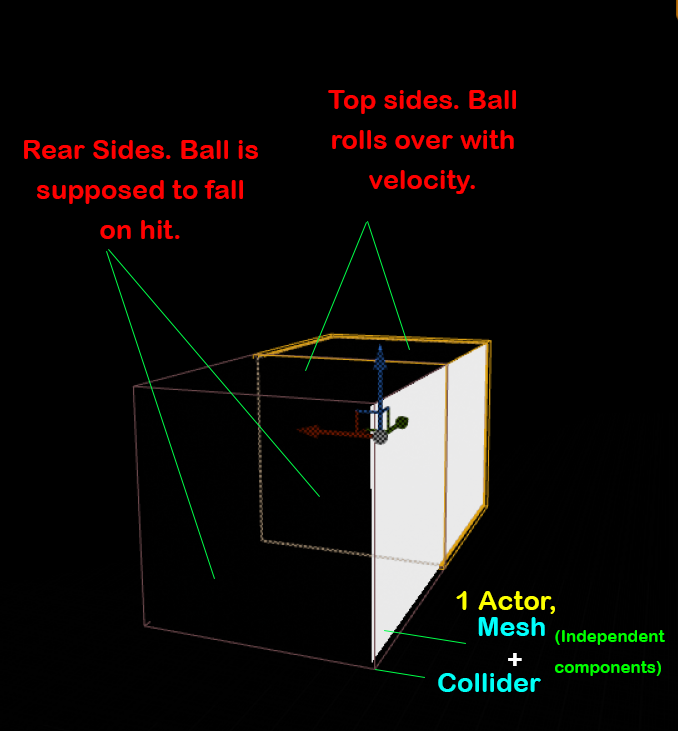
The early platform actor combined a cube mesh with a surrounding box collider. Touching the top was supposed to let the ball continue forward. But contact with the rear face triggered that same movement behavior, leaving the ball stuck against the platform instead of falling.
I separated the visual platform meshes from their collision responsibilities. Top colliders support forward movement; face colliders identify an unsuccessful approach. That distinction made the geometry of a landing explicit instead of asking one overlap event to represent every side of a platform.
Object pools instead of repeated spawning
Earlier versions created platforms as they were needed and destroyed them after use. I replaced that cycle with a fixed pool initialized when the level begins. Platforms and collider objects are activated for a section, returned to the pool, and reused as the player progresses.
Checkpoints made that reuse especially useful: a retry can reconstruct the relevant section using pooled objects. The same separation gives the level generator room to manage meshes, colliders and pickups without tying their lifetimes to a single monolithic actor.
Positioning colliders for a run of tiles
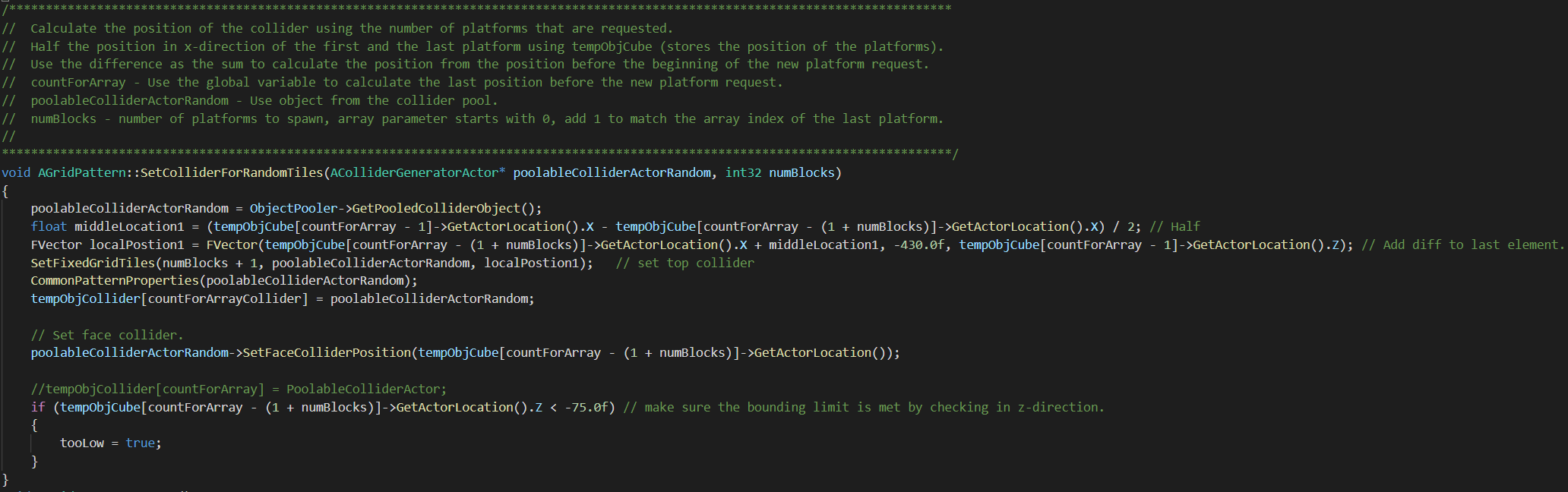
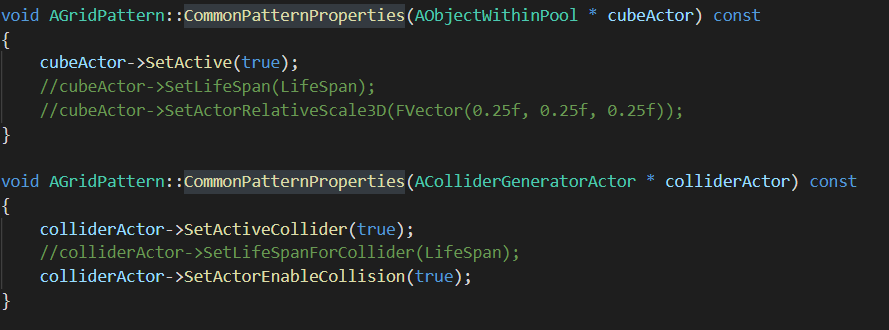
The implementation first places the platform meshes, then positions the collision volumes for that group. SetColliderForRandomTiles() receives a pooled collider actor and a block count. SetFixedGridTiles() handles a fixed set of blocks and position, while CommonPatternProperties() activates the collider behavior.
The documented prototype computes placement along the movement axis and keeps the lateral axis fixed. The important constraint is the landing surface: collision volumes must match the platforms that actually exist, including contiguous groups of tiles.
What this project taught me
Small gameplay problems can expose larger system-design issues. Fixing the rear-collision bug clarified component responsibilities; pooling made reuse explicit; and testing on mobile kept visual ambition tied to the available resources. The project connects my interests in C++, rendering, interaction and simulation through a complete playable prototype.
The original journal was still in progress. These notes describe the implemented systems and experiments it documents, without claiming later levels or unpublished performance results.

Space Ball Jump in motion
Project captures